

I managed to reduce maintenance times by 20%
through the design of UX flows focused on rapid learning
01_Problem detected
The complexity of the maintenance processes makes them difficult to understand
impacting plant efficiency
The maintenance of machinery in the processing plant is a process that requires years of technical expertise, making knowledge transfer challenging.
From a product design perspective, we identified an opportunity to improve training through a digital solution.
PreZero tasked us with designing and developing an app to train junior staff more efficiently and effectively, combining intuitive UX, clear interfaces and optimized learning flows to ensure operational continuity.


02_User Research & Insights
By thoroughly analyzing the plant’s operational context and synthesizing insights,
we identified the main pain points
After a thorough evaluation of the plant and gathering feedback from employees and the business team, we identified the main user problems.
Analyzing the operators’ comments, we discovered that:
Users did not easily remember the machinery maintenance steps.
For convenience or speed, they often skipped using the mandatory safety equipment.
Operators felt a lack of practice and on-the-job training.
These insights guided the design objectives: to create a solution that monitors personnel, reinforces plant safety, and effectively facilitates training.

From a product and UX/UI perspective, we started the project by investigating the plant’s operational constraints, with the goal of defining a viable MVP. Based on these constraints, we developed a wireframe that was reviewed with the business and development teams to validate its technical and economic feasibility.
After approval from the client and stakeholders, a high-fidelity mockup was designed, serving as the foundation for its subsequent implementation, ensuring the final solution combined functionality, usability, and an optimized user experience.
03_App Home
The home screen was designed as a central hub within the product ecosystem,
with a pedagogical approach aimed at facilitating learning.

The application was developed for local use within the plant, whether on the machines themselves or in training rooms. The plant already had maintenance processes focused on safety, so much of the development process centered around digitizing and making those processes traceable.
Homepage was designed to serve as a hub where users can easily access information and tutorials, in addition to the training modules themselves.
04_Positioning within the plant
Positioning within the plant A new way to integrate digital models into real environments, optimizing user interaction, learning, and operational efficiency


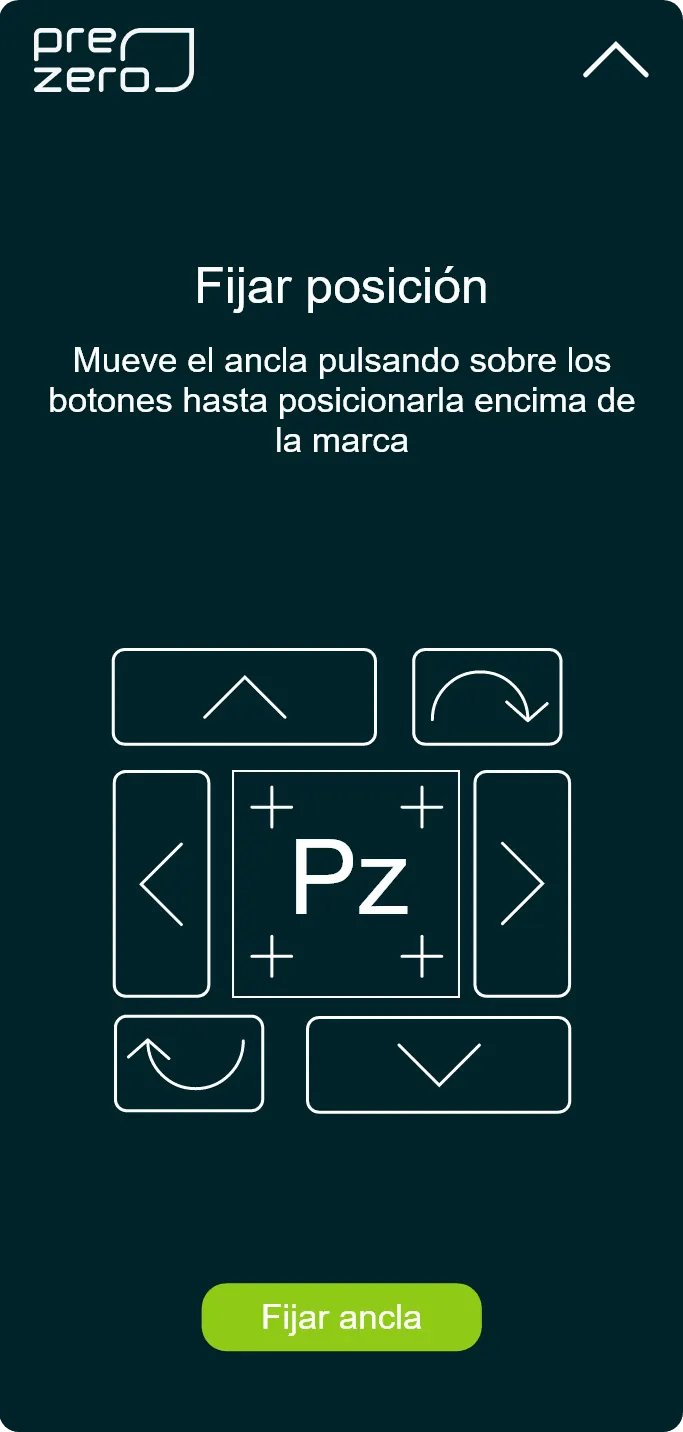
The positioning of digital models directly over the machines was accomplished using anchors, which must align with images on the floor.
Initially, we considered using QR codes to position the models in space. However, this approach was dismissed due to the requirement of placing the models in different locations for each session.
Instead, we chose a SLAM based system (the foundation of ARKit and ARCore), which allows us to position the models anywhere, whether on-site or in the office.
05_Video player and document viewer
Traditional PDF manuals were replaced with
interactive multimedia content
Training content modules were directly extracted from the manuals and supplemented with multimedia elements, such as supporting videos, to enhance user understanding.
Regardless of the machine on which the training is conducted, the interface remains consistent, promoting a quick learning curve and allowing users to focus on the content.


06_Visual guides for users
Interactive visual indicators were designed in the AR/UI interface to highlight which parts needed to be manipulated

Throughout the training, safety measures are emphasized, often highlighted with specific steps such as requiring participants to wear gloves or ensuring that machinery is turned off and that no one is nearby.
The application clearly indicates operational zones using an orange glow.
In situations where training occurs directly on the machinery, the digital model is hidden, with glowing indicators on the actual machine marking the operational areas. This approach makes it much clearer where work needs to be performed.
Additionally, it enables users to overlay the required steps directly onto the physical machine. By being connected to a cloud-based system, it gathers data, enhances performance, and streamlines machine management.
07_POC HoloLens glasses
The integration of HoloLens was evaluated as part of the product design strategy,
exploring new interaction solutions.
To validate the potential use of this device and identify any drawbacks within the plant, a Proof of Concept (POC) was created.
The application was ported to HoloLens, and the menus were adapted for use on the device.


The HoloLens augmented reality glasses are operated using hand gestures, but they do not detect very good collisions between hands and digital objects. This limitation presented a challenge since the system we had developed was primarily designed for use with tablets.
To address this, we decided to redesign the click and selection system to enable full functionality without the need for controllers.
Our solution involved implementing time-based buttons. In this approach, the user hovers the cursor over a button, and an on-screen indicator fills up to confirm and execute the action.
As an assistant, the main screen follows the user and can be deployed when needed, allowing it to be moved out of the worker’s field of vision to avoid distraction during tasks.

The login was used as a means to identify which user was undergoing the training.
Another challenge we encountered was user inputting text. To mitigate this friction, we leveraged the device’s built-in voice recognition and transcription functionality.
This function was made optional for sensitive content.
Since this was only a proof of concept, it was conducted with a single training session.


08_Guidance screens and placement of the digital model in the real space
Guidance screens evolved into a contextual assistant t
hat supports the user throughout the workflow.


The training guidance screens were designed similarly to the tablet version: simple, with digitized content and step-by-step instructions.
A strong emphasis was placed on safety measures, which are now more tangible due to the device.
In this context, the use of HoloLens headset versions was studied, as they were being launched into the market at that time. It was dismissed due to cost considerations.
Ultimately, hololens device was dismissed for several reasons, including the device’s limited adaptability to dusty environments and the complexity of wearing the glasses for extended periods during maintenance activities.
09_The result
As a result, users can conduct training sessions in the learning rooms, leveraging the Digital Twin technology for simulations and real-time feedback.
.
Maintenance times were reduced by 20%, as new operators can perform maintenance tasks at the same level of efficiency as the more experienced ones, thanks to the Digital Twin's predictive capabilities.
.
The supervision of operators and machinery is now much easier and more efficient due to the integration of Digital Twin models for enhanced monitoring and diagnostics.
.
The project included an application addressing similar topics, but it approached them through the use of virtual reality These solutions were seamlessly integrated into the existing platform.
.
In this project, I learned the importance of tailoring solutions to the specific environment in which they will be implemented. Additionally, I discovered that certain technologies, even if initially designed for professional settings, cannot be deemed effective until they are thoroughly tested in real-world scenarios.
Main techniques in this project:
Prototyping and Wireframing, Interaction design,Accessibility (WCAG), User research and analysis (Google Analytics, Hotjar, Test A/B, Interviews...), Responsive design, AGILE, SCRUM and design thinking, User-centered design (UCD),Design systems (Libraries, tokens, documentation...), User research techniques and analysis (Google Analytics, Hotjar, Test A/B, Interviews...), AGILE, SCRUM and design thinking and User-centered design (UCD)
Are you interested in new tech projects, check this project: